Top Index Card Apps for Productivity
- Prem Sundaram

- Oct 20, 2025
- 4 min read
In today’s fast-paced world, staying organized is key to maintaining productivity. Whether you are a student, professional, or creative thinker, having a reliable way to capture and organize your ideas can make a huge difference. Mobile card organizers have become essential tools for managing tasks, notes, and projects on the go. These apps mimic the traditional index card system but add the convenience of digital access and powerful features.
Using mobile card organizers allows you to break down complex information into manageable chunks. You can easily rearrange, categorize, and search your notes, making it simpler to review and act on your ideas. This blog post explores some of the best mobile card organizers available today, highlighting their unique features and how they can boost your productivity.
Why Mobile Card Organizers Are Essential for Productivity
Mobile card organizers offer a flexible and visual way to manage information. Unlike long, linear notes, cards let you focus on one idea at a time. This approach helps reduce overwhelm and improves clarity. Here are some reasons why mobile card organizers are a must-have:
Visual organization: Cards can be color-coded, tagged, or grouped, making it easier to find and connect related ideas.
Portability: Access your notes anytime, anywhere, on your smartphone or tablet.
Easy editing: Add, delete, or rearrange cards with simple gestures.
Collaboration: Share cards or entire decks with colleagues or classmates.
Integration: Sync with calendars, reminders, or cloud storage for seamless workflow.
For example, a writer can use mobile card organizers to outline chapters, while a student can create flashcards for exam preparation. Project managers can track tasks and deadlines visually, improving team communication.

Top Mobile Card Organizers to Try Today
There are many mobile card organizers available, each with its own strengths. Here are some of the top options that stand out for their features and ease of use:
1. NoteDex
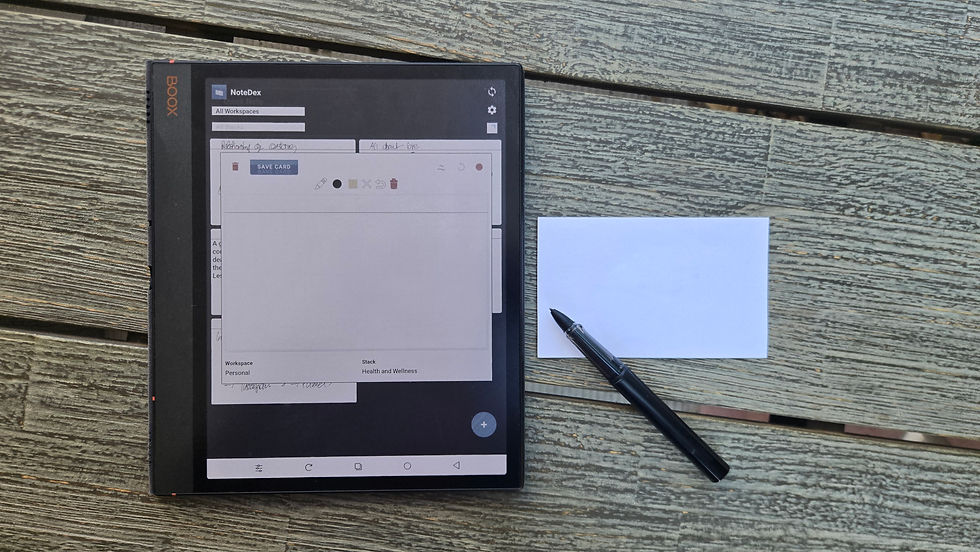
NoteDex is a versatile app that combines the simplicity of index cards with powerful digital tools. It allows you to create cards with text, images, and even audio. You can organize cards into decks and customize their appearance with colors and fonts. NoteDex supports cloud syncing, so your cards are always up to date across devices.
One standout feature is the ability to link cards, creating a web of related ideas. This is perfect for brainstorming or research projects. The app also supports exporting cards to PDF or other formats, making it easy to share your work.
2. Trello
Trello is a popular project management tool that uses a card-based system. While it is more focused on team collaboration, it works well as a mobile card organizer for personal productivity too. You can create boards for different projects and add cards for tasks or notes. Cards can include checklists, attachments, due dates, and comments.
Trello’s drag-and-drop interface makes it easy to prioritize and move cards between lists. It integrates with many other apps like Google Drive and Slack, enhancing your workflow.
3. Microsoft OneNote
OneNote offers a flexible note-taking experience with a card-like feel through its pages and sections. You can create individual notes that act like cards and organize them in notebooks. OneNote supports multimedia content, handwriting, and drawing, making it ideal for creative users.
Its powerful search function helps you find cards quickly, even if you have hundreds of notes. OneNote syncs across all your devices and integrates well with other Microsoft Office apps.

4. Google Keep
Google Keep is a simple and intuitive mobile card organizer. It uses sticky-note style cards that you can color-code and label. Keep supports voice notes, image attachments, and reminders. Its integration with Google Drive and Google Docs makes it easy to transfer information between apps.
The app’s minimalist design is perfect for users who want a straightforward way to capture quick ideas and to-dos.
5. Notion
Notion is an all-in-one workspace that includes a powerful card system. You can create databases with card views, allowing you to organize notes, tasks, and projects visually. Notion supports rich content, including tables, calendars, and embedded media.
Its flexibility makes it suitable for individuals and teams who want to customize their productivity system extensively.
What is the best note taking app with index cards?
If you are looking for a note-taking app that specifically uses an index card format, NoteDex is an excellent choice. It is designed to replicate the traditional index card experience digitally, offering a familiar yet enhanced way to organize your notes.
NoteDex allows you to create cards that can be sorted, filtered, and linked. This makes it easy to build a structured knowledge base or study system. The app supports multimedia content, so you can add images, audio, and even sketches to your cards.
One of the key benefits of NoteDex is its focus on simplicity combined with powerful features. It is suitable for students, professionals, and creatives who want a flexible tool for capturing and organizing ideas.

How to Choose the Best Mobile Card Organizer for You
Selecting the right mobile card organizer depends on your specific needs and preferences. Here are some factors to consider:
Purpose: Are you using it for study, project management, brainstorming, or general note-taking?
Features: Do you need multimedia support, collaboration tools, or integration with other apps?
User interface: Choose an app with an interface that feels intuitive and comfortable.
Platform compatibility: Ensure the app works on your devices and syncs across them.
Cost: Some apps are free with optional premium features, while others require a subscription.
Try out a few apps to see which one fits your workflow best. Many offer free trials or basic versions that let you test their capabilities.
Boost Your Productivity with the Right Tools
Using a mobile card organizer can transform how you manage information and tasks. By breaking down complex ideas into simple cards, you can focus better and stay organized. Whether you prefer a minimalist app like Google Keep or a feature-rich platform like Notion, there is a mobile card organizer to suit your style.
For those who want a dedicated digital index card experience, consider exploring the index card app NoteDex. It offers a perfect blend of traditional note-taking and modern technology to help you stay productive.
Start organizing your ideas today and experience the benefits of mobile card organizers firsthand. With the right app, you can turn your scattered thoughts into clear, actionable plans.